Your venue's listing on familyaction.co.uk, and everything you can do with it. UK edition, September 2026.
Why claim your listing
Claim your listing
Your first sign-in: five things to do
Screen by screen
Plans
My venue is not listed yet
Questions
Contact us
1. Why claim your listing
Family Action lists family-friendly venues across the UK: indoor play
centres, trampoline parks, zoos, museums, pools, playgrounds and more. We
continually discover and add venues, so yours may already be on
familyaction.co.uk before you arrive.
Claiming your listing is free and gives you control of what
families see: your photos, opening hours, pricing, party details, booking
links and social media. You receive enquiries from families, and you can
see how families find and use your listing.
Want more visibility? Business and Growth
plans add sponsored placement, local market insight and marketing tools.
Every screen in this guide is marked Free, Business plan or Growth plan.
Where you sign in. Family Action for Business is the one
portal for every country we operate in. UK venues sign in at
business.familyaction.co.uk, which takes you to the
portal with your country already chosen.
2. Claim your listing
Claiming is not submitting. Submitting tells us a venue
exists; claiming tells us you own it and gives you access to manage it.
If your venue is already on the site, you do not submit it again; you claim it.
Not on the site at all? See section 6.
1Find your venue page
Search for your venue on familyaction.co.uk and open its page. The address looks like familyaction.co.uk/activity/your-venue-name.
2Click "Claim this listing"
Fill in the short form: your name, your role at the venue, a contact email and a phone number we can reach you on.
3We check and approve
We usually review claims within one business day. If your email address
matches your venue's website, that is normally enough. If it does not
(a Gmail address, or a venue without a website), we look at the details
you gave and anything public that ties you to the venue, and approve on
judgement; we may email or call. If we cannot confirm ownership we
decline, and you can claim again with a verifiable address or reply
with evidence.
4Set your password
Once approved you receive an email from hello@familyaction.co.uk
with a link to set your password. The link works once and for seven
days; if it has expired, use Forgot your password? on the
sign-in page to get a new one.
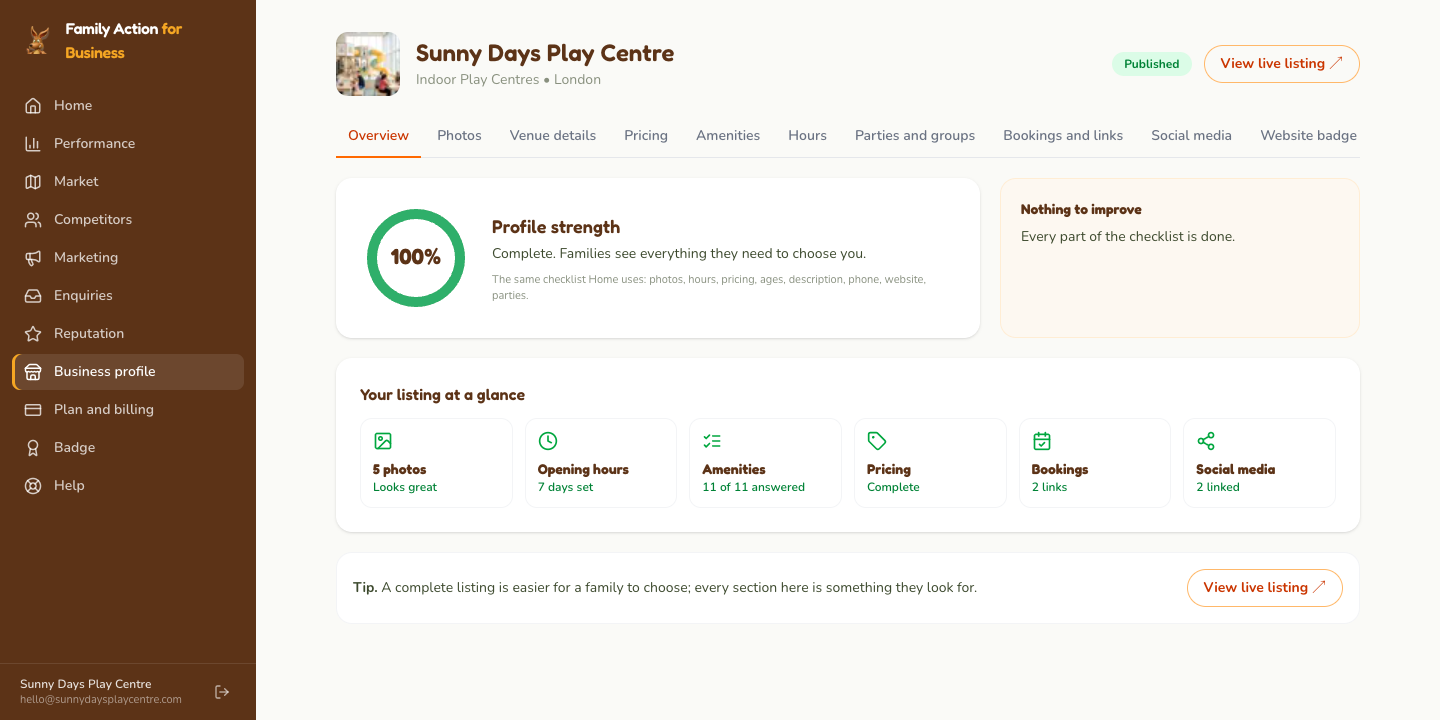
Everything below is under Business profile in the menu on
the left. Each tab has its own Save changes button; your
listing updates as soon as you save.
Check your name, phone and website on the Venue details tab, and write a description if there is not one.
Add your opening hours on the Hours tab, day by day, including the days you are closed.
Add your prices on the Pricing tab: a one-line summary and up to four price lines (for example Child, Adult, Family).
Upload your own photos on the Photos tab: up to five, landscape, up to 10 MB each. The first one is your listing's thumbnail. Photos we found on Google may already be there; add your own alongside them (section 7 explains why it matters).
Add a booking link on the Bookings and links tab if families can book or buy tickets on your website. Your listing gets a Book now button.
Then click View live listing at the top of your Business
profile and look at your page as a family would. If you host birthday
parties, the Parties and groups tab is the next stop.
Business profile: the Overview shows what is complete and what to improve; each tile opens the right tab.
4. Screen by screen
Every screenshot below is of a demonstration venue, Sunny Days Play
Centre, in UK; your screens look the same with your own listing
in them. The portal works on a phone as well as a computer.
Home Free
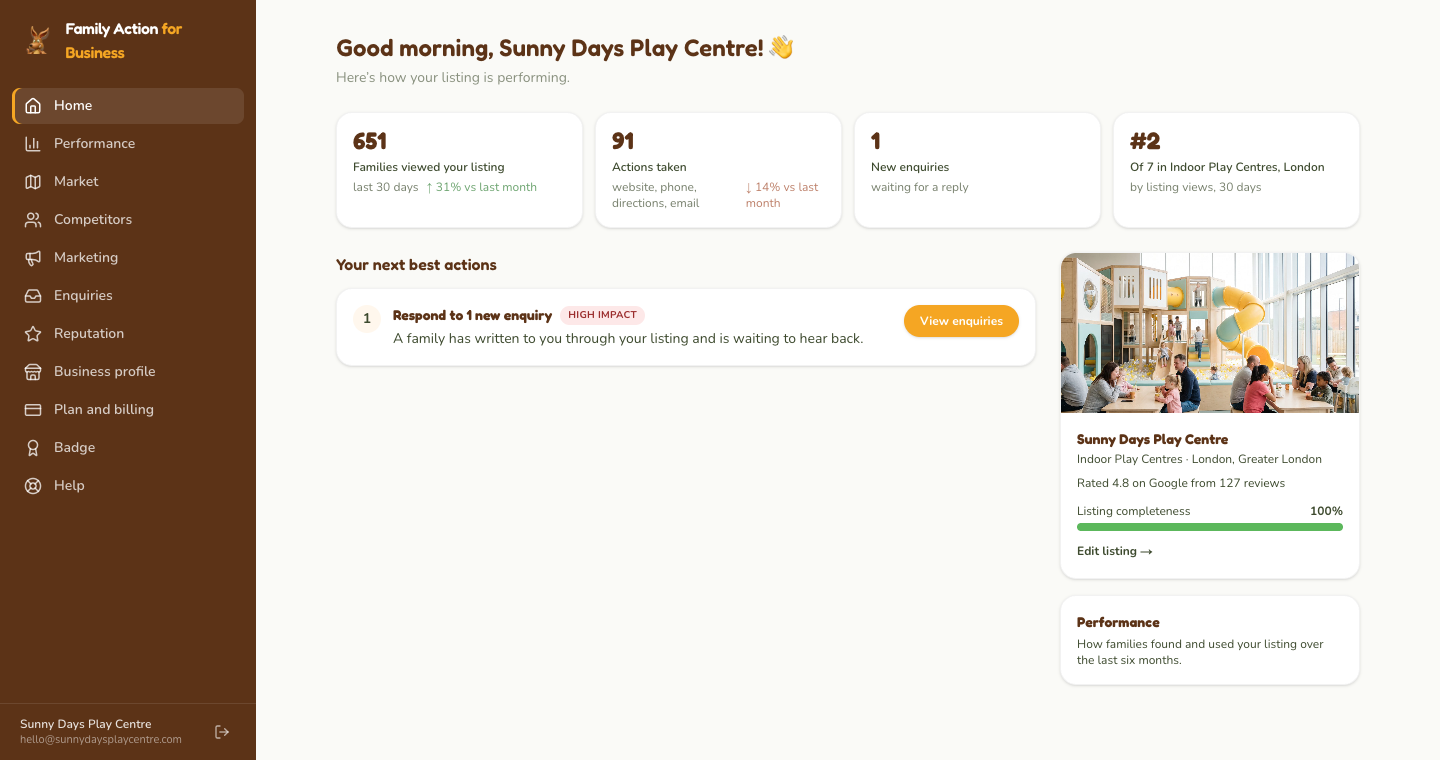
Home suggests what to do next, based on what is missing from your listing
and on recent activity: an enquiry waiting for a reply, a school holiday
coming up, photos or hours not yet added. Once your listing has enough
traffic to measure, it also shows the last 30 days at a glance.
Home: your suggested next actions, each with a button that takes you to the right place.
Performance Free
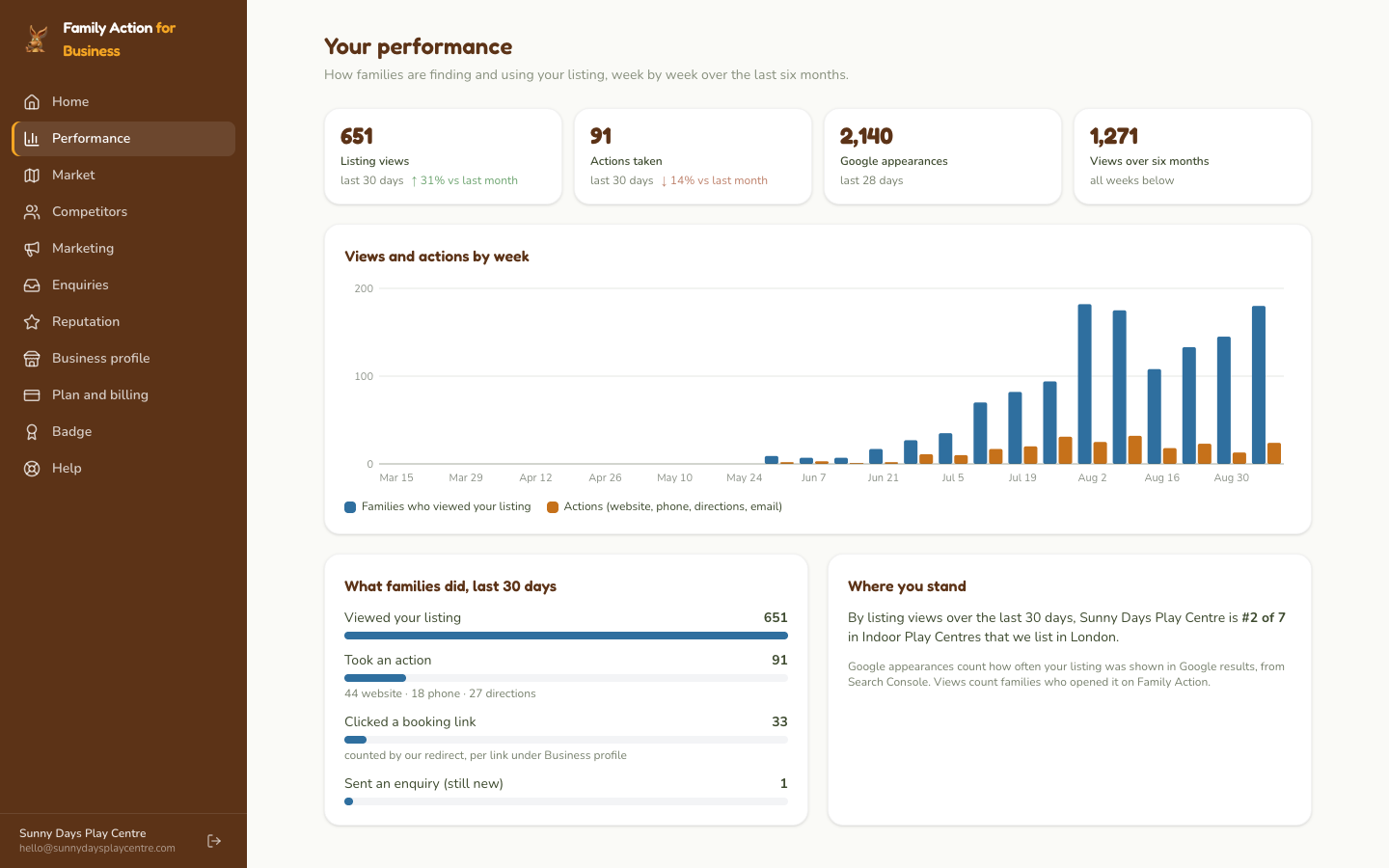
Views and actions week by week over the last six months, and the last 30
days in steps: how many families viewed your listing, how many took an
action (visited your website, called, asked for directions), how many
clicked a booking link, and how many sent an enquiry. It also shows where
you stand by views among the same kind of venue in your suburb. A listing
with too little traffic to measure sees a short note instead of a chart;
we do not draw a trend through numbers too small to mean anything.
Performance: views and actions by week, then the 30-day steps from viewing to enquiring.
Enquiries Free
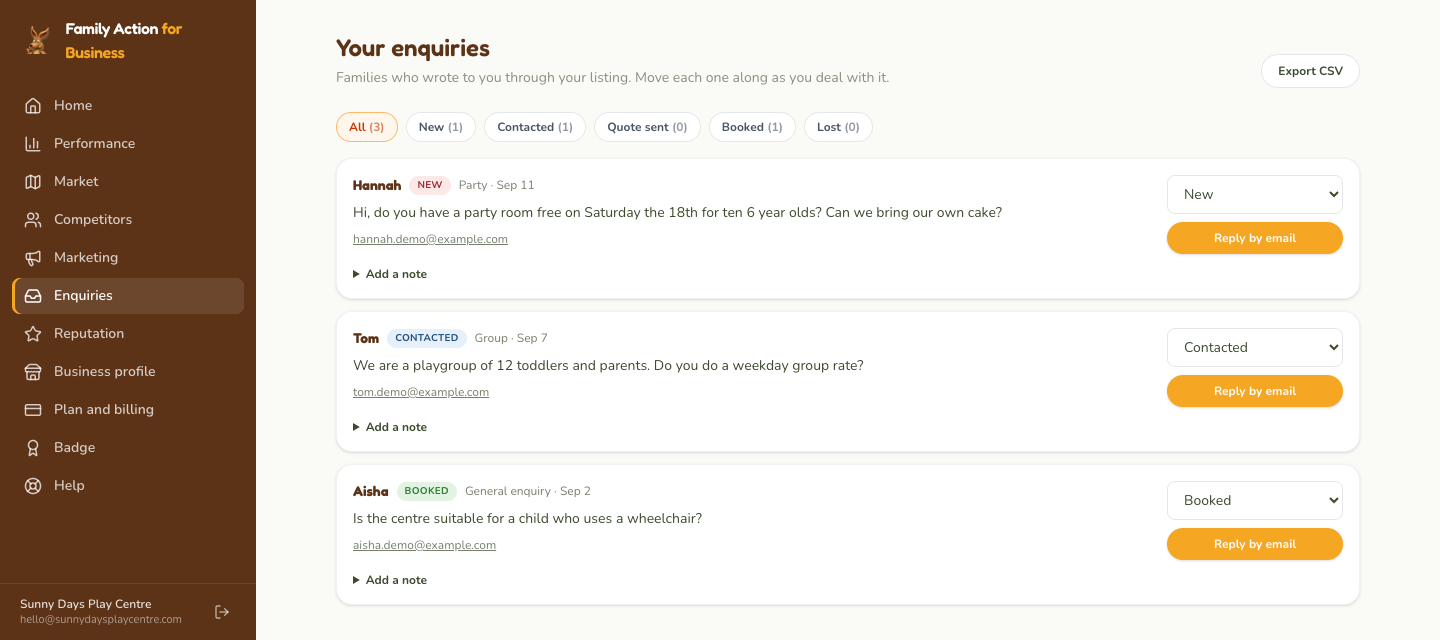
Families can write to you from your listing. Every enquiry appears here
with a stage you set (new, contacted, quote sent, booked, lost), a note
field, a reply button that opens your email, and an export to a
spreadsheet. Enquiries are also emailed to your listing's contact address
once we have confirmed it can receive mail; until then they are here only,
so check in.
Enquiries: set the stage on the right, reply by email, add a note for yourself.
Business profile Free
Your listing, one tab per part. Each tab saves on its own.
Tab
What you can change
Photos
Up to five photos; the first is your thumbnail. Photos that came from Google are marked.
Venue details
Description, age range, phone, website.
Pricing
A one-line price summary and up to four price lines.
Amenities
Cafe, parking, toddler friendly, indoor or outdoor, change rooms, pram access, free entry, wheelchair access, good for children. Each is Yes, No or Not set.
Hours
Opening hours per day, including closed days.
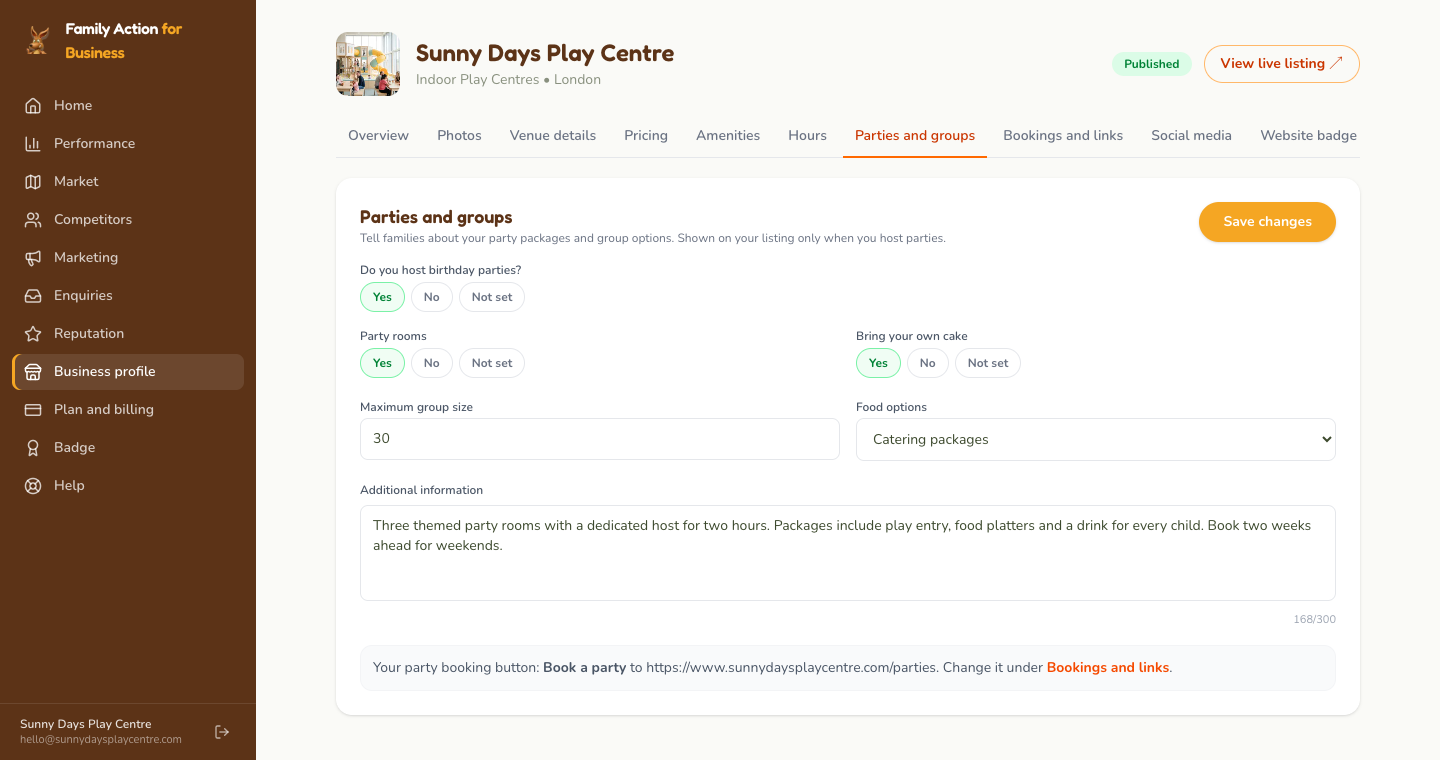
Parties and groups
Whether you host birthday parties, and if so party rooms, maximum group size, bring-your-own cake, food options, and anything else families should know.
Bookings and links
Up to six links to your booking or ticket pages. One "General admission" link becomes the Book now button on your listing.
Social media
Facebook, Instagram, TikTok, YouTube, LinkedIn.
Website badge
Code to paste into your own website for a "Featured on Family Action" badge that links to your listing. The same badge is under Badge in the menu.
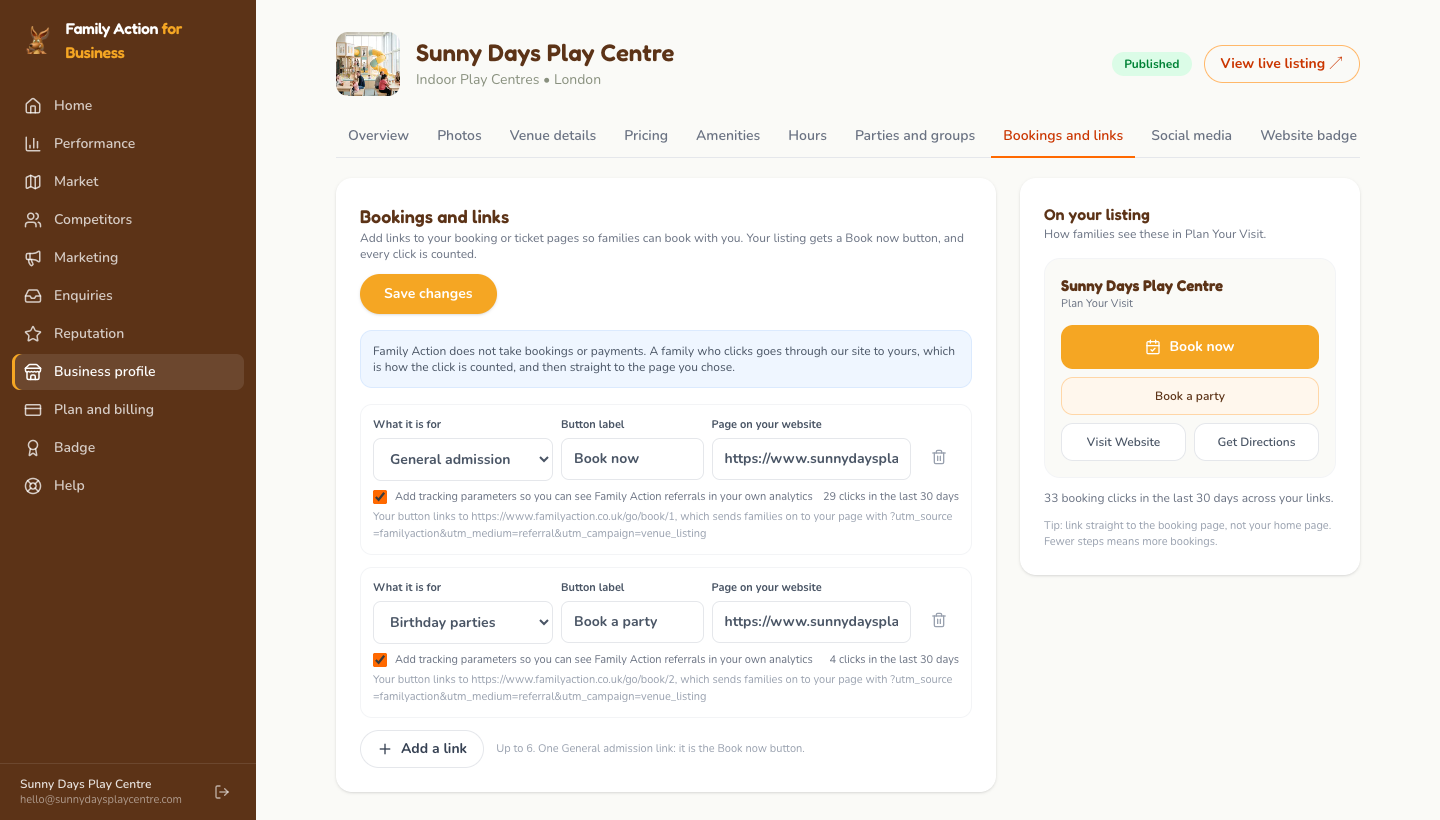
Bookings and links: choose what the link is for, type the button label, paste the page address, then Save changes.
How booking links work. A family who clicks your Book now
button passes through our site on the way to yours, which is how the click
is recorded, and lands on the page you chose. Family Action does not take
bookings or payments. You see clicks per link on this tab and in your
Performance steps. Leave "Add tracking parameters" ticked and your own
website analytics will show visits from Family Action.
Parties and groups: answer Yes to parties, then fill in what families ask about.
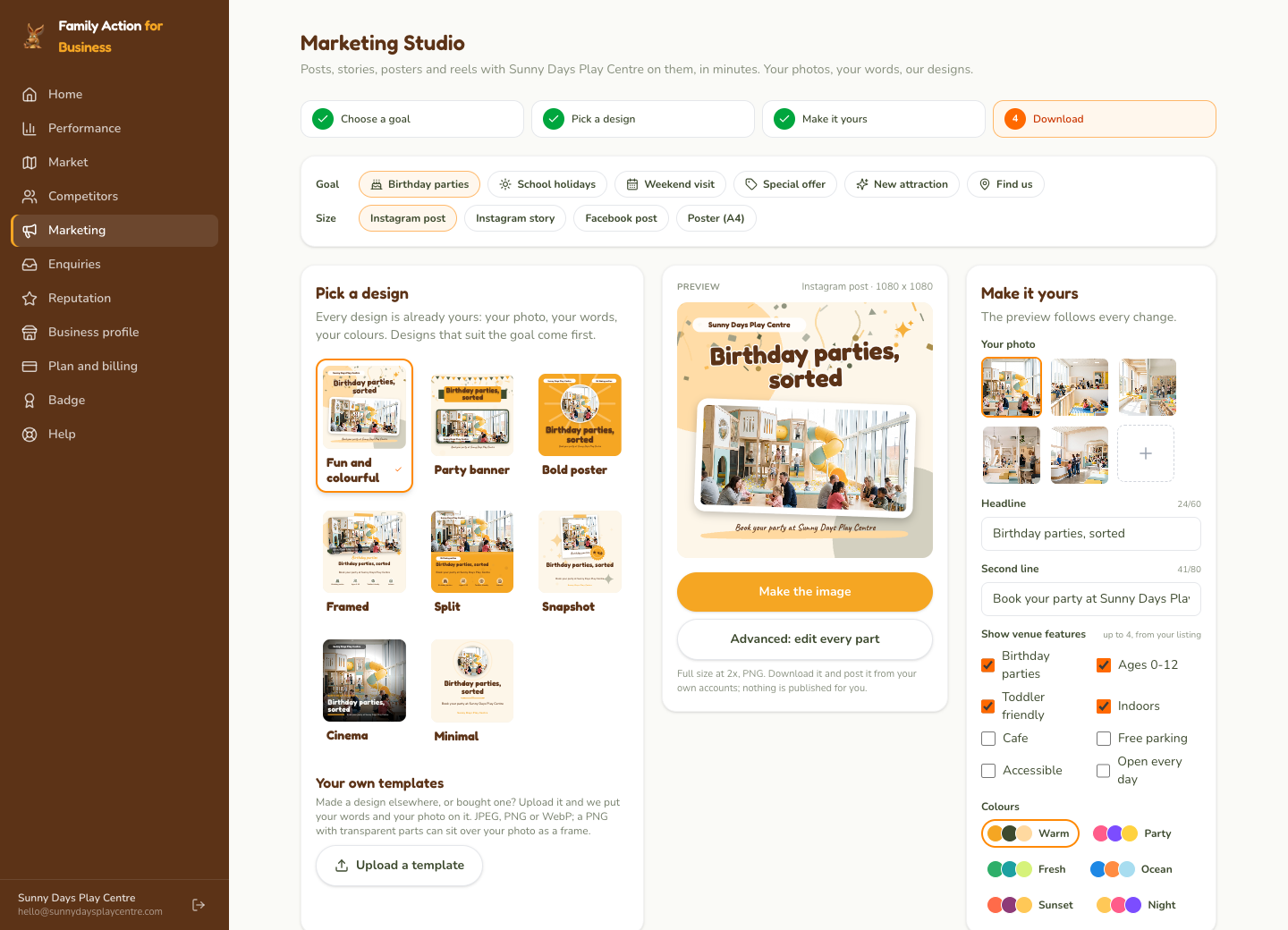
Marketing Studio Business plan
Posts, stories and posters with your venue on them. Pick a goal (birthday
parties, school holidays, a weekend visit, an offer, something new, find
us), a size (Instagram post or story, Facebook post, A4 poster) and a
design; every design is drawn with your photo, your words, your colours
and your venue's features. Edit the headline and second line, choose a
colour palette, tick which features to show, then Make the
image and download it. Nothing is posted for you; you post it from
your own accounts.
Marketing Studio: pick a design on the left, edit the words and colours on the right, make the image in the middle.
Your own templates. Made a design elsewhere, or bought one? Upload it and the studio puts your words and your photo on it.
Advanced editor. Every part of a design can be moved, restyled or replaced.
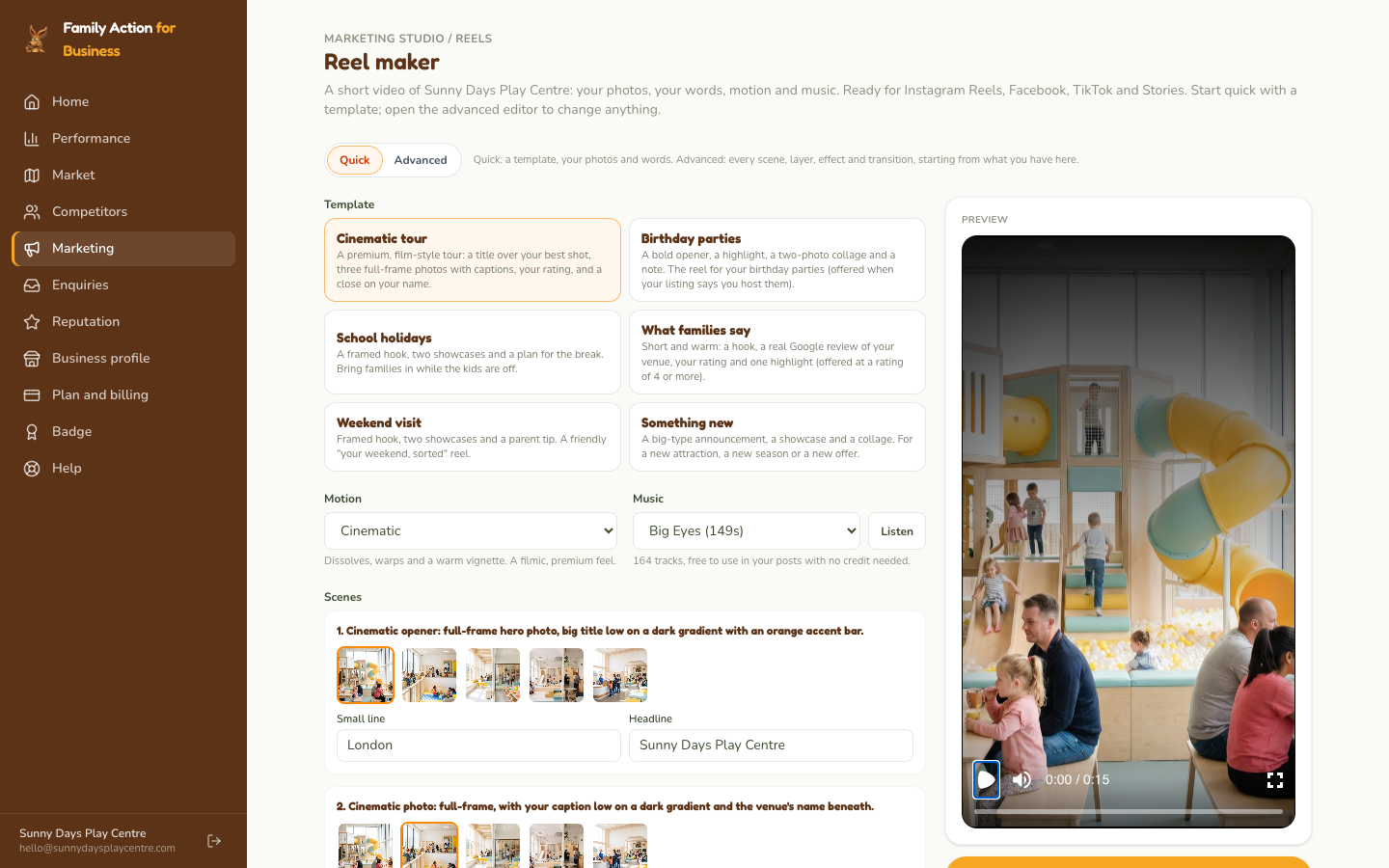
Reel makerGrowth plan: a 15-second video from your photos with movement, transitions and music, made for you to download.
Your own photos only. The studio uses photos you have uploaded, not photos we found on Google, because we cannot verify that your venue has permission to reuse those. Only upload photos you own or have permission to use.
Reel maker: choose a template, pick a photo for each scene, add music, then make the reel.
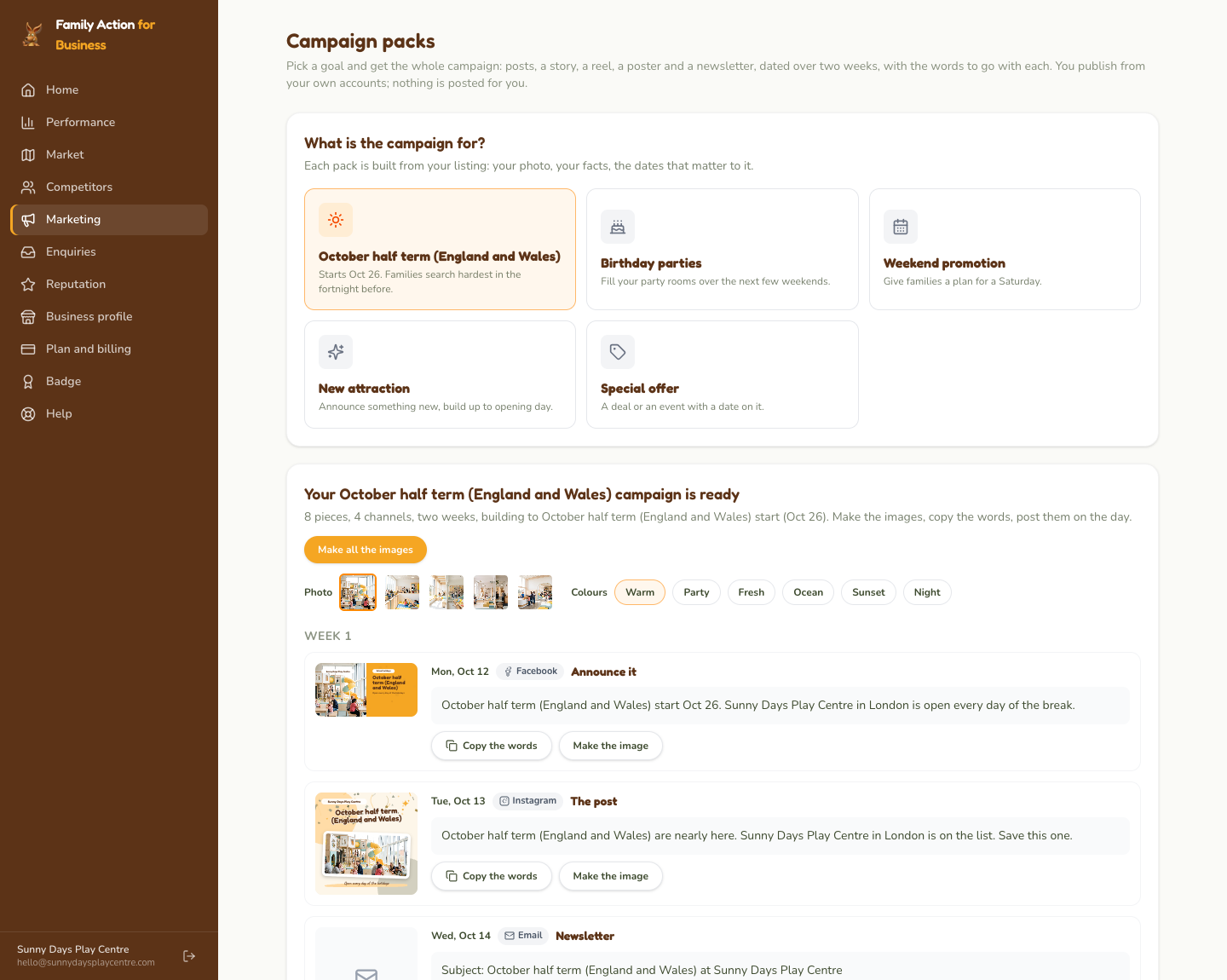
Campaign packs Growth plan
A whole campaign for one goal, not one image at a time. Pick the next
school holidays, birthday parties, a weekend promotion, a new attraction
or a special offer, and you get a two-week schedule: a Facebook post, an
Instagram post and story, a reel, a reminder for the second week, an A4
poster for the door and a newsletter, each with its date and the words to
go with it, all written from your listing. Make the images, copy the
words, post them on the day. As with everything here, you publish from
your own accounts; Family Action never has access to them.
Campaign packs: pick the goal, then work down the schedule; each piece has its words to copy and its image to make.
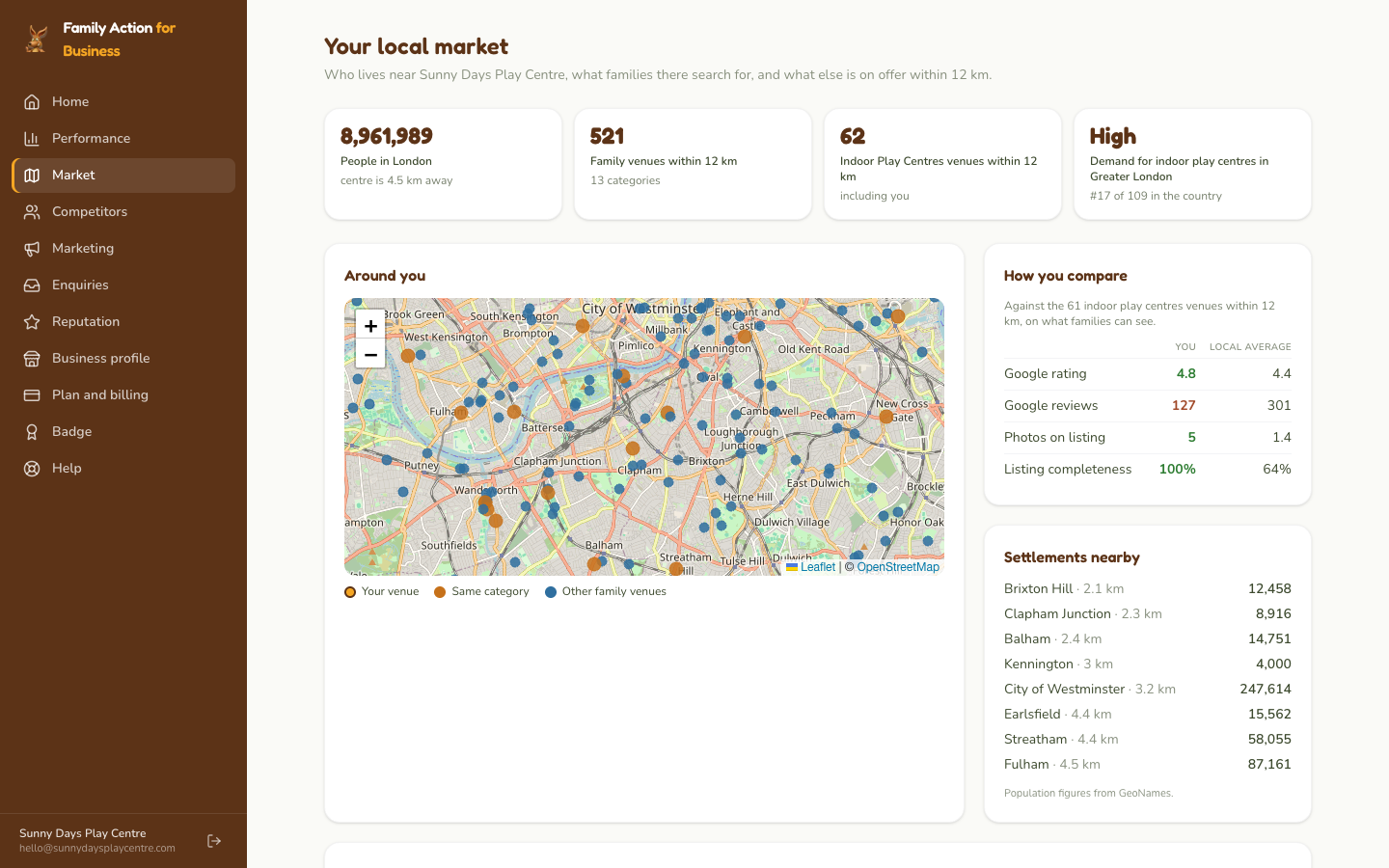
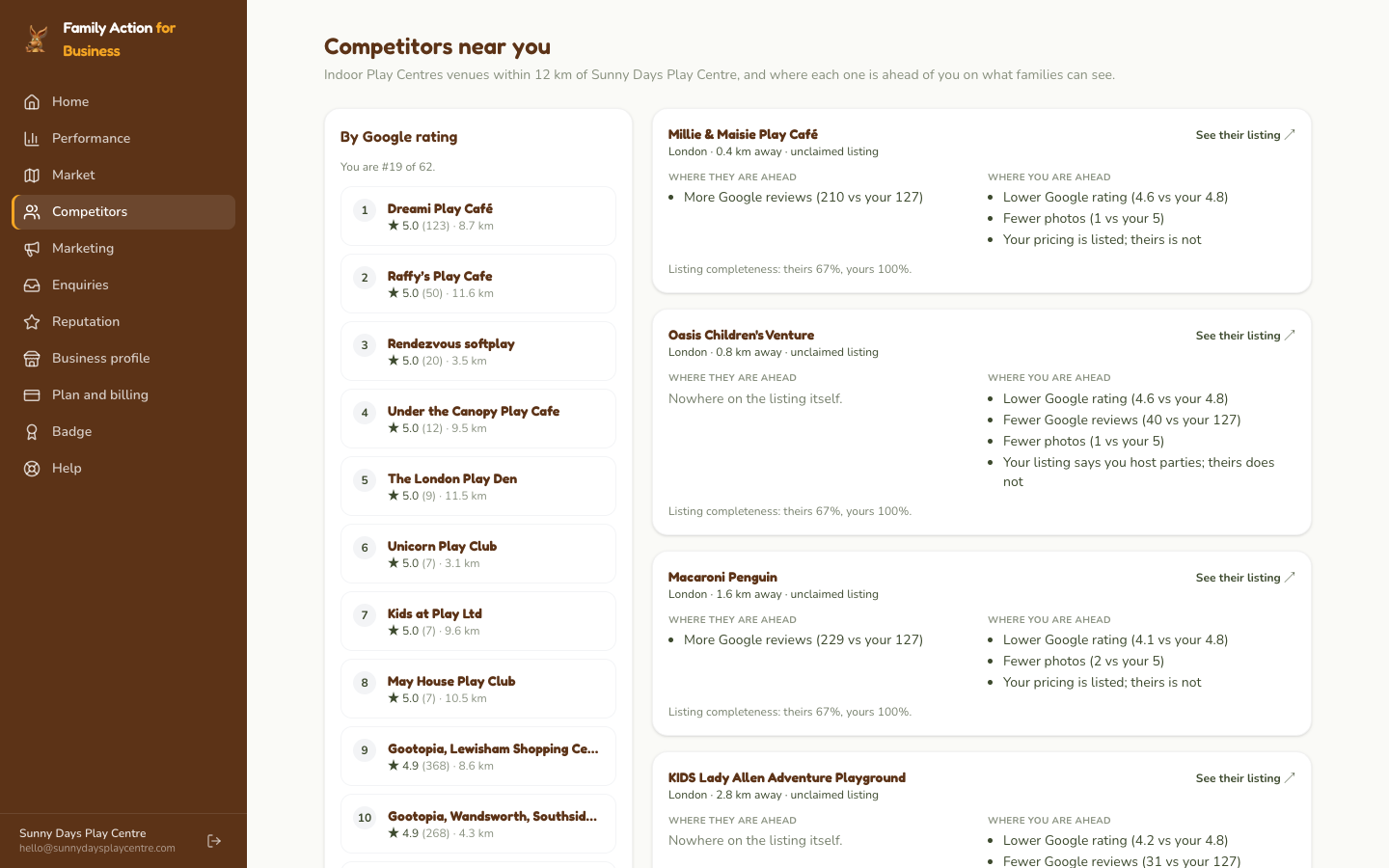
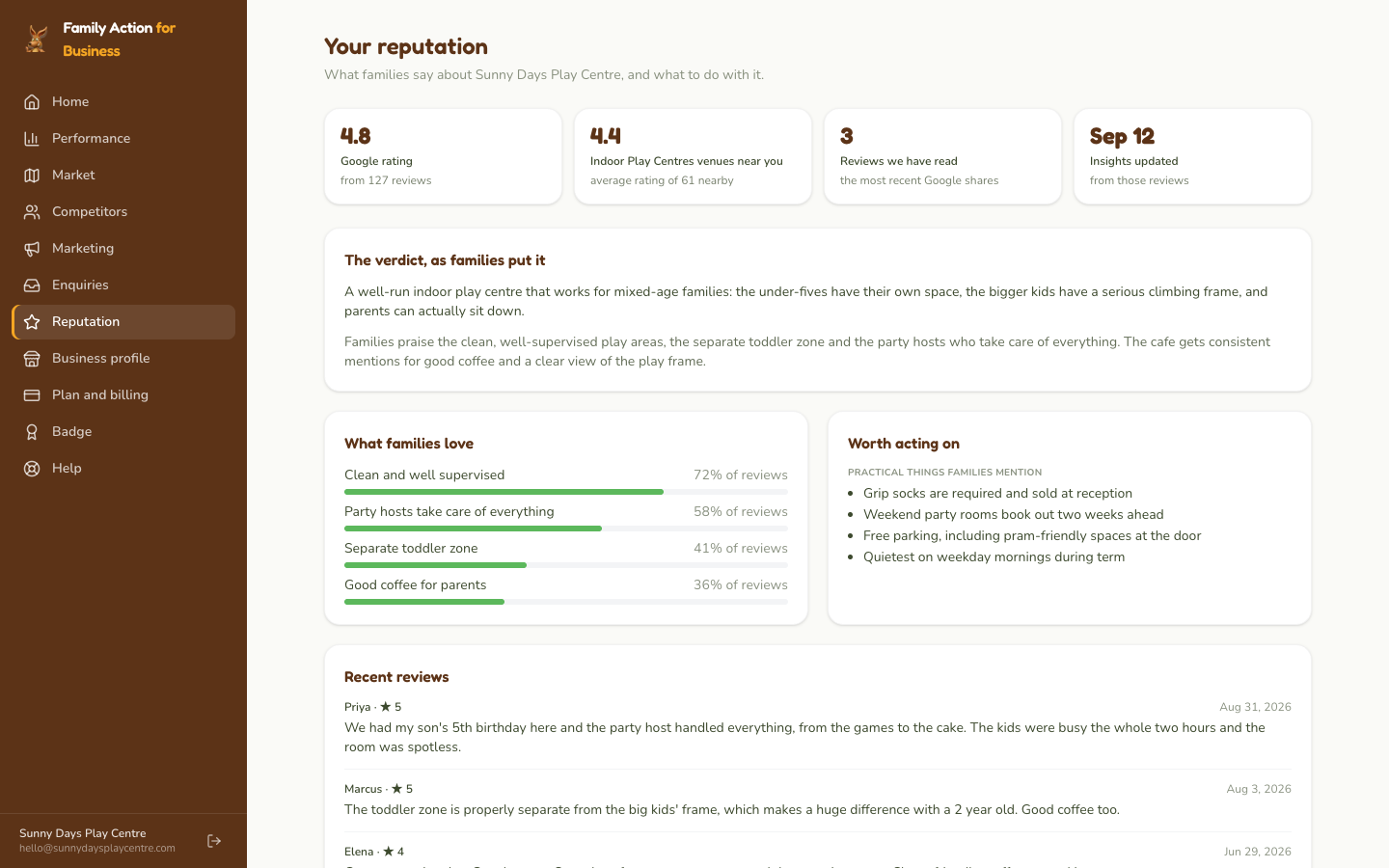
Market, Competitors and Reputation Business plan
Market shows who lives near you: your city and the
settlements around it with their population, everything we list within
12 km on a map, and how often families in your region search for your
kind of venue. Competitors lists the same kind of venue
within 12 km by Google rating, with where each is ahead of you and where
you are ahead. Reputation puts your Google rating, the
themes in what families write about you, and the recent reviews Google
shares in one place. (Performance's "where you stand" compares by suburb;
these two compare by distance, so the two lists can differ.)
Market: people nearby, venues within 12 km on the map, and how you compare on rating, reviews and photos.Competitors: the same kind of venue within 12 km, and where each is ahead.Reputation: your rating, the themes families mention, and recent reviews.
Plan and billing, Badge, Help
Plan and billing shows the plans and where your venue
stands today. Badge gives you the "Featured on Family
Action" code for your website. Help is where to reach us.
If you manage more than one venue, choose the venue at the top of each screen.
5. Plans
Claiming and the core listing are free. Paid plans are month to month.
Free
£0
Keep your listing accurate. Manage what families see and receive their enquiries.
Business
£39 / month
Get found and understand your market. Sponsored placement in your category, your local market and competitors, your reputation, and the Marketing Studio.
Growth
£59 / month
Stand out in your area. Everything in Business, plus a banner on your category page, the hero position on your city page where available, the reel maker, campaign packs and priority support.
What you get
Free
Business
Growth
Listed in search and on category and city pages
✓
✓
✓
Photos, hours, pricing and party details
✓
✓
✓
Enquiries from families, with a simple pipeline
✓
✓
✓
How families find and use your listing
✓
✓
✓
Sponsored placement: ahead of others in your category, with a badge
✓
✓
Your local market: population, demand and venues nearby
✓
✓
How you compare with similar venues near you
✓
✓
What families say about you, and what to do about it
✓
✓
Marketing Studio: posts, stories and posters with your venue on them
✓
✓
Reel maker: short videos from your photos, with music and motion
✓
Banner on your category page
✓
Hero position on your city's things-to-do page (where available)
✓
Campaign packs: a two-week set of posts, a story, a reel, a poster and a newsletter, ready for you to publish
✓
Priority support
✓
Family Action Pty Ltd is an Australian company not registered for UK VAT; no VAT is charged. Billing is by card through Stripe, month to month, from the day
you upgrade; your plan's features and placement are live as soon as the
payment goes through. To move to a lower plan or cancel, message the team
from the Plan page (or email hello@familyaction.co.uk)
and it is done within one business day; your listing stays up either way.
6. My venue is not listed yet
If you have searched carefully and your venue is not on the site, submit it:
Fill in the form (name, address, category, contact, website)
We review it and add it to the directory, usually within one to two business days
Once it is live, claim it (section 2)
Submitting does not give you ownership. Submitting lets us
know the venue exists; claiming, once it is live, is what gives you access.
7. Questions
I cannot sign in.
Choose your country first (it is where your account lives), then your
email. If you never set a password, or have forgotten it, click
Forgot your password? on the sign-in page and we email you a
link that works once and for seven days.
Will I be emailed when a family sends an enquiry?
Yes, to your listing's contact email, once we have confirmed that the
address can receive mail (we check it when you claim). Until then,
enquiries are in Family Action for Business only, so sign in and look
under Enquiries.
I saved a change but the listing still shows the old information.
Your listing updates within a minute or two of saving. If it does not,
reload the page, and if it still shows the old information after ten
minutes, email us with the venue name and what you changed.
Why are the photos on my listing not in the Marketing Studio?
Photos we found on Google are shown on your listing but we cannot
verify that your venue has permission to reuse them, so the studio and
the reel maker only use photos you upload yourself. Upload your own
under Business profile, Photos, and they appear in every design. Only
upload photos you own or have permission to use.
Do you take bookings?
No. Your booking links send families through our site to your own
booking page, so we can record the click, and nothing else happens in
between. Payments, availability and confirmations are all yours.
Can I manage more than one venue from one account?
Yes. Claim each venue with the same email address. They all appear in
the one account; choose the venue at the top of each screen. Contact
us if you would like us to link a chain or franchise in one go.
Can a colleague have their own sign-in?
Not yet; one account per venue, and the account email is the one that
claimed it. Contact us if the person who claimed has left and the
account needs to move to someone else.
How do I change or cancel my plan?
Upgrade any time from Plan and billing. To move to a lower plan or
cancel, message the team from the Plan page or email
hello@familyaction.co.uk; it is done within one
business day. Your plan stays active until the end of the current
billing period, then drops back to Free, and your listing stays up.
My venue uses a Gmail address, not one on our website.
Claim anyway. We look at the details you give and anything public that
ties you to the venue, and approve on judgement; we may email or call.
If we cannot confirm ownership we decline, and you can claim again with
an address on the venue's website or reply with evidence.
I see incorrect information on my listing right now.
The fastest path is to claim the listing and edit it yourself. For an
urgent correction before your claim is processed (a wrong phone number,
say), email hello@familyaction.co.uk with the venue
name and the correction and we fix it for you within one business day.
Will my listing be removed if I do not claim it?
No. Unclaimed listings stay live as long as the venue is operating.
Claiming gives you control of the content; we are happy to list your
venue either way.
I submitted my venue but I cannot edit it. Why?
Submitting and claiming are different. Submitting tells us the venue
exists; claiming tells us you own it and gives you access. Once your
submitted venue is live, open its page on familyaction.co.uk and click
Claim this listing.
8. Contact us
If anything here is unclear or you are stuck, email
hello@familyaction.co.uk. Include your venue name and
the address of your listing on familyaction.co.uk if you can; it
makes it much faster for us to help.